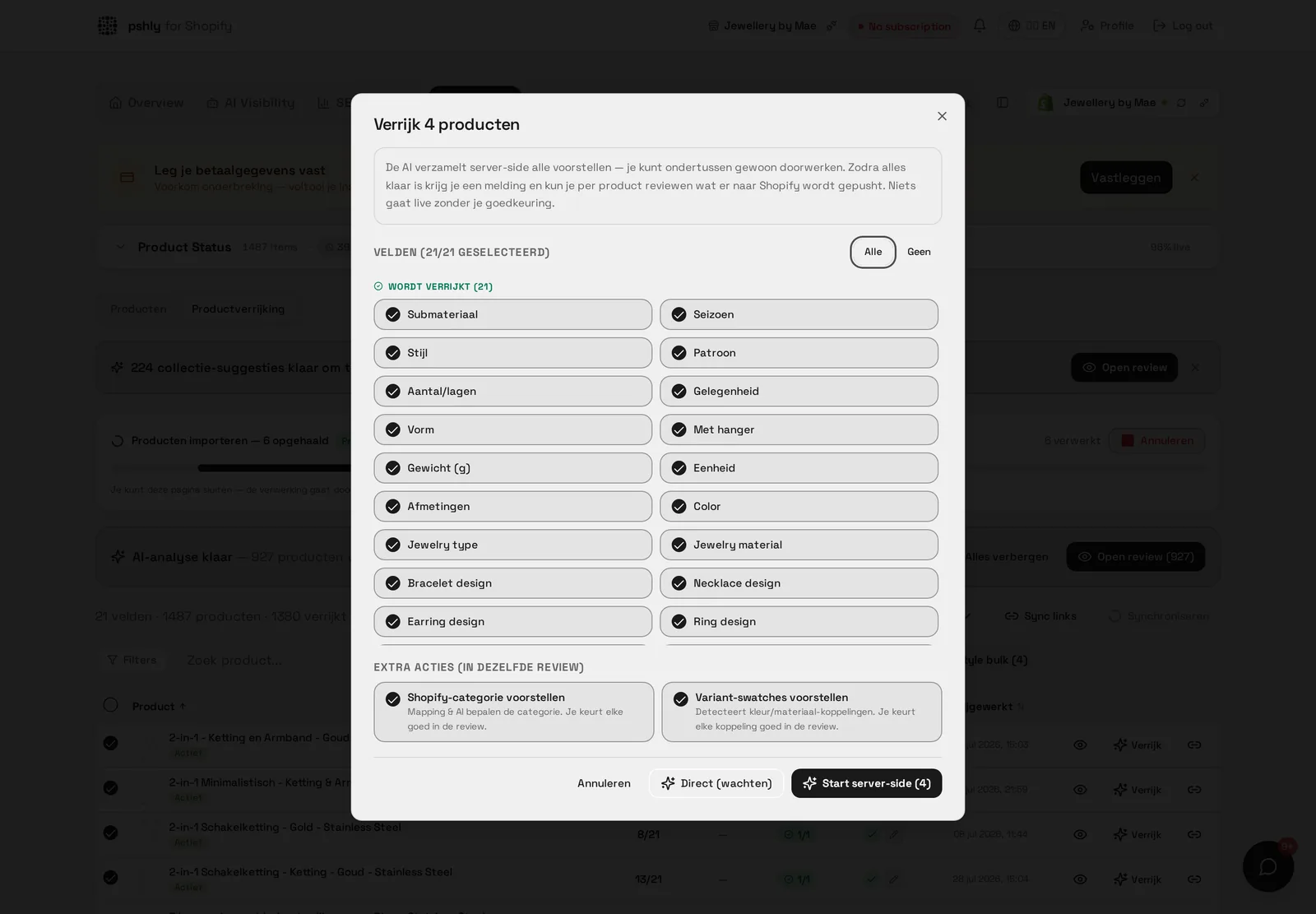
Anyone who has tried to enrich a thousand products at once using a tool that runs in the browser knows the problem: the moment you close the tab, hit the wrong key, or your laptop falls asleep, the process stops halfway. For a catalog of 50 products that's annoying. For a catalog of 5,000 products it's unworkable. That's why bulk jobs in pshly.ai run entirely server-side, independent of your browser.
The problem with browser-bound processing
Many tools perform bulk actions as a loop in the browser: an API call per product, waiting for the response, then moving to the next one. As long as the tab stays open and active, this works. In practice, though, it fails because of:
- Browser tabs that get paused by the operating system as soon as they run in the background.
- Network interruptions that crash the entire loop without a clear error message.
- Users who accidentally close the tab after twenty minutes of waiting.
- No way to check progress from a different device.
For a store with 3,000 products that you want to enrich in one action, this is a real risk: you lose time, credits can be consumed inconsistently, and you don't know exactly which products have and haven't been processed.
How server-side bulk jobs work
When you start a bulk action in pshly.ai — for example generating SEO titles for an entire collection — a job is created and placed in a queue on the server. From that moment on, your browser is no longer needed. The job:
- Processes products one by one or in small batches, with error handling per item.
- Continuously saves progress and results, so nothing is lost during an interruption.
- Keeps running regardless of whether you're logged in, have closed your browser, or switch devices.
- Automatically completes once all items are processed or the queue is empty.
You can close the tab, shut your laptop, and come back an hour later to find the job finished — without having to do anything.
Realtime progress bar
Even though the job doesn't depend on your browser, you naturally want to know how it's going. That's why pshly.ai shows a realtime progress bar that updates every second: how many products have been processed, how many remain in the queue, and how many failed. Open the page on a different device and you'll see the exact same live status, because progress is tracked on the server, not locally in your browser memory.
Job logs for full transparency
Every bulk job keeps a detailed log. For each processed item you see:
- The product ID and title.
- The time it was processed.
- Whether the action succeeded, failed, or was skipped.
- In case of an error: the exact error message, so you know whether it was a temporary network issue or a structural problem with that specific product.
These logs remain available after the job finishes, so you can verify afterward exactly what happened — for example when a colleague asks why a particular product didn't get a new title.
Automatic retry on failure
Not every failure is permanent. A temporary network error, a short peak load at Shopify, or a brief rate limit can cause a single item to fail without anything structurally wrong. Bulk jobs in pshly.ai automatically retry failed items, with a small delay, before marking them as definitively failed. That prevents you from having to manually track down and resubmit dozens of products after a job that succeeded 95% of the time.
Deduplication of item IDs
In large catalogs with filters, collections, and manual selections, there's a real risk that the same product accidentally ends up in the same job twice — for example because it appears in multiple selected collections. Bulk jobs automatically deduplicate item IDs before processing starts, so you never waste credits by enriching the same product twice within one job.
The queue: priority and order
When you start multiple bulk jobs in sequence — for example first titles, then meta descriptions, then metafields for the same selection — they are placed in a queue and handled one after another. You don't have to wait for the previous job to fully complete before setting up the next; you can just keep working and the jobs stack up neatly. This is especially valuable during a first large cleanup of a catalog, where you often want to run multiple enrichment steps in sequence.
Real-world example: thousands of products in one session
A store with more than 4,000 products started a bulk job to generate metafields and SEO titles at the same time. Instead of staying glued to the screen for the entire workday, the job ran in the background while the team worked on other tasks. After a few hours the entire catalog was processed, with a log file showing exactly which products were updated and which needed manual attention due to missing source data.
What this means for your workflow
Server-side processing turns bulk enrichment from a risky, time-consuming session into a background task. You start a job, get on with your work, and check the progress bar and logs later. For a full explanation of the entire bulk workflow, including filters and selection options, see the documentation on the bulk workflow.
Get started
What a full run delivers in practice
At G&F Verpakkingen the first big clean-up ran as three consecutive bulk jobs: titles, meta descriptions and metafields for 512 products. Together that covered over 3,500 fields that would otherwise have been filled by hand — an estimated 120 hours of work. The jobs ran in the background while the team carried on with other tasks; only the review step required real attention. In the weeks after publication organic traffic rose by 34%. The point is not that AI types faster, but that the lead time of a catalogue-wide improvement drops from months to days.
How to split a large run
For catalogues above a thousand products a fixed order works best: titles first, then handles, then meta descriptions, then metafields. Each step builds on the previous one, so the handle always follows the final title. Start every step on a subset of fifty products, check the review, and only then queue the full catalogue. That way you catch anomalies in your source data before spending credits across thousands of products.
Want to experience what it's like to start a bulk job and simply close your browser? Start free and enrich your first batch of products without staying tied to the screen.