A checkout discount code is invisible on your product and collection pages: no struck-through price, no sale badge, no higher CTR in Google Shopping.
Sale Campaigns
Discounts with real compare-at prices — launched in bulk, reverted in one click
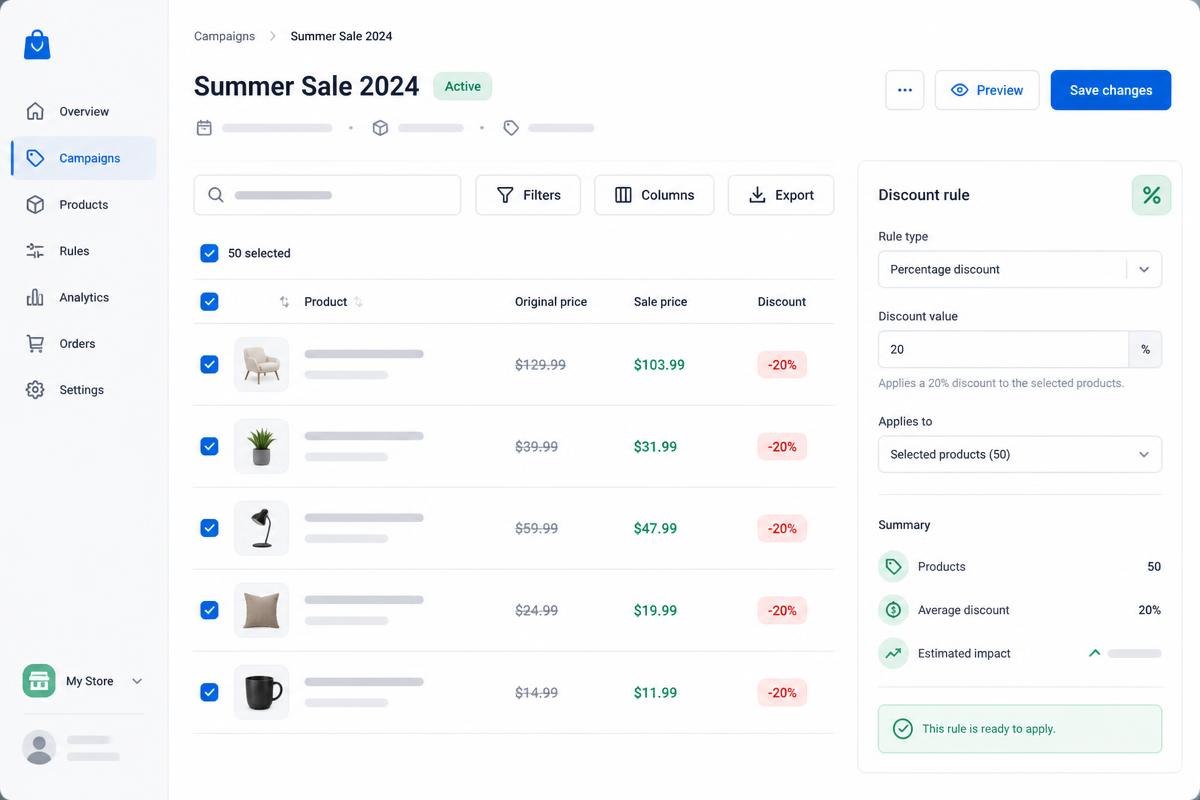
Select products in Pshly.ai, pick your discount rule and set both the price and the compare-at price in Shopify at once. Your discount becomes visible everywhere: product pages, collections, sale badges and shopping feeds. And because every original price is captured first, you can end the campaign exactly as it started.
Start freeThe problem
Discount codes are invisible — and editing prices by hand is endless work
Editing price and compare-at price by hand for hundreds of variants takes hours — and everything has to go back exactly after the campaign.
Without captured original prices nobody remembers what the pre-campaign price was. Reverting becomes guesswork.
The EU rule on the lowest price of the past 30 days turns a wrongly filled compare-at price into a legal risk.
The solution
One workflow to launch, monitor and end a campaign
Pshly.ai turns a discount into a manageable object. Choose a rule (percentage, fixed amount or fixed price), optionally with charm rounding to .95 or .99, fill the compare-at price automatically and add a sale tag for your collections and themes. Before anything changes we capture the original price and compare-at price per variant. The campaign runs server-side as a bulk job, so you can close the tab. Ending it puts every variant back to its captured value.
- Real compare-at prices in Shopify — visible on product and collection pages, sale badges and product feeds
- Discount rules: percentage, fixed amount or one fixed sale price for the whole selection
- Charm rounding to .95 or .99, or exact calculation without rounding
- Per-variant snapshot of the original price and compare-at price before the campaign
- Add a sale tag so automated SALE collections and theme badges work immediately
- End in one click: every variant returns to its exact original price
- Server-side bulk jobs with a progress bar, per-product job logs and resume after interruption
What you get
Everything you need for a safe campaign
Apply in bulk
Select hundreds of products in your product list and launch in one go. Everything runs server-side.
Compare-at prices
The compare-at price is filled with the original price so the discount is visible everywhere.
EU 30-day check
We track price history and warn you when your compare-at price exceeds the lowest price of the past 30 days.
Snapshot & revert
Every original price is captured. Ending the campaign restores your catalogue exactly.
Sale tags
Add a tag automatically so your SALE collection and theme badges are instantly correct.
Job logs & progress
Track per product what succeeded and what did not, with error messages in plain language.
How it works
Live in five steps
1
Select your products in the product list — filter by tag, type, status or SKU.
2
Choose 'Start sale campaign' and set your rule: percentage, amount or fixed price, with or without charm rounding.
3
Check the preview prices and the EU warning, name your campaign and optionally add a sale tag.
4
The campaign runs to Shopify as a server-side bulk job — follow progress and per-product job logs.
5
End the campaign whenever you want: all prices return exactly to the captured originals.
ROI Calculator
Calculate how much you save with AI content
Find out in 10 seconds how many hours and how much money you save on product copy, collections, alt tags and blog posts.
Calculate my savingsFrequently asked questions
Questions about sale campaigns
What users say
Trusted by Shopify stores
"Our product content was a patchwork of styles. Pshly.ai standardized everything and the results in Google are clearly visible – we're growing every month."
Frank
founder of G&F Verpakkingen
"I expected it would take weeks to write all the content. With Pshly.ai, my entire store was filled with professional texts and blogs in no time."
Maelyn
founder of Jewellery by Mae
Ready to get started?
Launch your first campaign with real compare-at prices — and revert it in a single click.